Running LLMs on AMD Ryzen AI NPU under Linux — A First
March 8, 2026
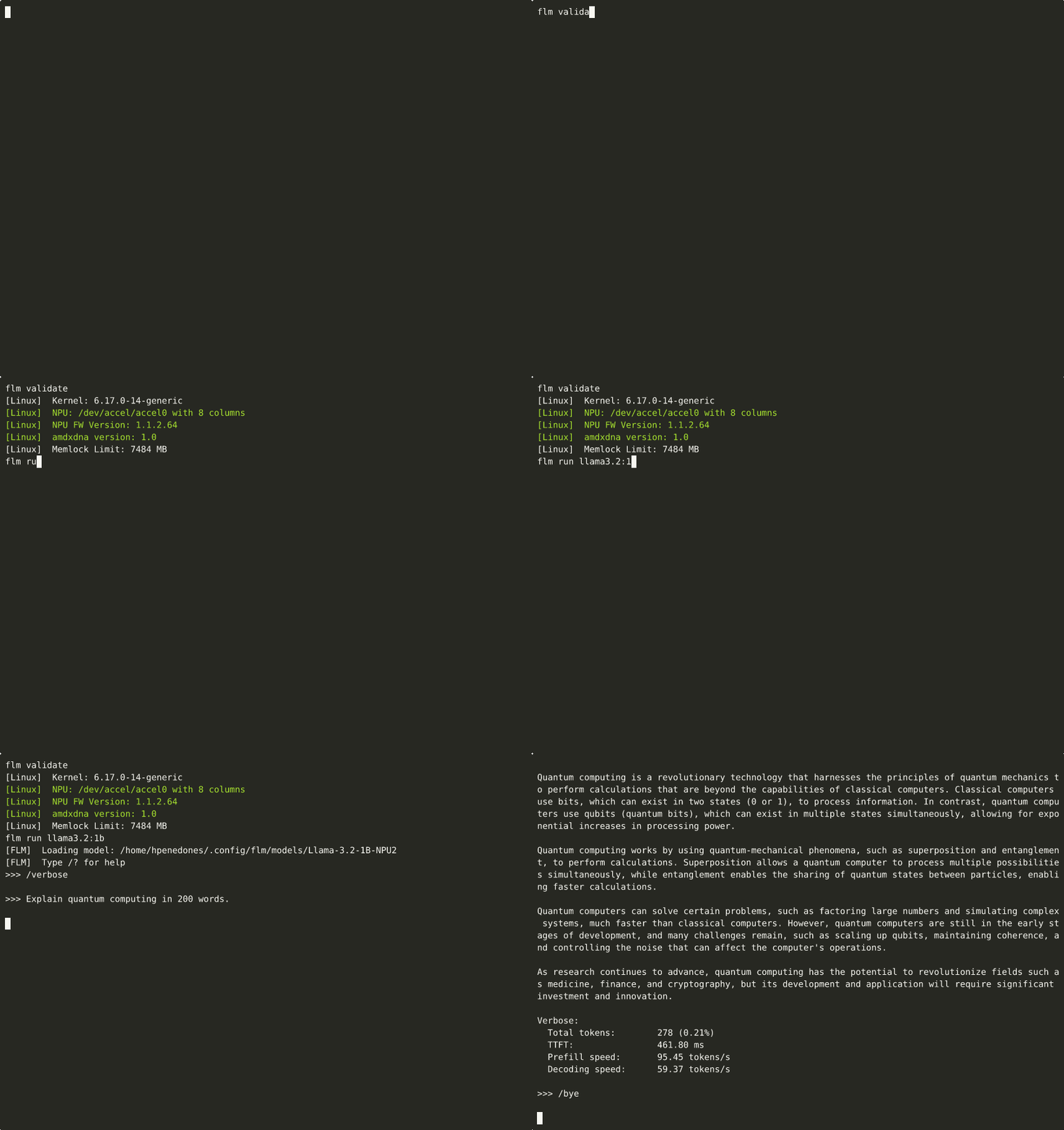
I just got Llama 3.2 1B running at 60 tokens/sec on my nucbox mini PC’s NPU (Neural Processing Unit) (AMD Ryzen AI 9 HX 370) under Ubuntu Linux — something that, as far as I can tell, hasn’t been publicly demonstrated before.
The problem
AMD shipped the XDNA2 NPU in Ryzen AI processors (Strix Point, Strix Halo, Kraken Point) with up to 50 TOPS of AI compute. On Windows, tools like Ryzen AI Software and FastFlowLM make it easy to run LLMs on the NPU. On Linux? Not so much.
The official Ryzen AI 1.7 stack is missing a critical shared library (onnxruntime_providers_ryzenai.so) on Linux (amd/RyzenAI-SW#333
), and FastFlowLM doesn’t ship Linux binaries (FastFlowLM#381
). The GitHub issue amd/RyzenAI-SW#2
— simply titled “Linux?” — has over 2,300 upvotes and 1,100+ comments since 2023.
The solution
It turns out that FastFlowLM recently added Linux shared libraries and a CMake preset for Linux builds (thanks to AMD kernel developer Mario Limonciello and the FastFlowLM team). The code is there — it just isn’t documented or packaged yet.
Building FastFlowLM from source on Linux works. The key steps are:
- Install build dependencies (cmake, ninja, Rust/Cargo, boost, ffmpeg libs, readline, etc.)
- Install XRT
from AMD’s PPA (
ppa:amd-team/xrt) — providing bothlibxrt-devandlibxrt-npu2 - Override XRT paths in CMake, because the PPA installs to
/usr/instead of/opt/xilinx/xrt/:cmake --preset linux-default \ -DXRT_INCLUDE_DIR=/usr/include \ -DXRT_LIB_DIR=/usr/lib/x86_64-linux-gnu - Build and install:
cmake --build build -j$(nproc)
sudo cmake --install build
The cmake --install step is essential — it sets the RPATH to $ORIGIN/../lib, without which the binary can’t find its shared libraries at runtime.
Docker: one command to rule them all
To make this reproducible, I packaged everything into a Docker image :
# Build
docker build -t fastflowlm .

# Run
docker run -it --rm \
  --device=/dev/accel/accel0 \
  --ulimit memlock=-1:-1 \
  -v ~/.config/flm:/root/.config/flm \
  fastflowlm flm run llama3.2:1b
The --device flag passes the NPU to the container, and --ulimit memlock=-1:-1 is required because the container’s default memory lock limit is too low for NPU operations.
Benchmarks
I benchmarked 8 models on the Ryzen AI 9 HX 370 (Strix Point, 50 TOPS):
| Model | Parameters | TTFT (ms) | Prefill (tok/s) | Decode (tok/s) |
|---|---|---|---|---|
| Qwen3 0.6B | 0.6B | 535 | 52.4 | 88.7 |
| LFM2 1.2B | 1.2B | 363 | 49.6 | 62.9 |
| Llama 3.2 1B | 1.2B | 460 | 95.9 | 60.1 |
| Qwen3 1.7B | 1.7B | 640 | 37.5 | 40.4 |
| Gemma3 1B | 1.0B | 550 | 34.6 | 37.9 |
| Llama 3.2 3B | 3.2B | 957 | 46.0 | 24.4 |
| Phi-4 Mini 4B | 3.8B | 926 | 11.9 | 20.0 |
| Qwen3 4B | 4.0B | 1040 | 23.1 | 18.7 |
The sweet spot seems to be the 0.6B–1.2B range, where you get truly interactive speeds (60–90 tok/s). Even the 3B and 4B models are usable at 19–24 tok/s.
🤖 Plot twist: this was built by AI
The entire project — diagnosing the broken official stack, discovering that FastFlowLM builds from source, identifying all the unlisted build dependencies, creating the Dockerfile, writing the README, benchmarking, and even recording the demo GIF — was done by Claude Opus 4.6 running inside GitHub Copilot CLI .
I provided the hardware and the goal (“run an LLM on my NPU”). The AI figured out the rest, iterating through failed builds, reading GitHub issues, and debugging shared library paths until it worked.
Try it yourself
If you have a laptop with an AMD Ryzen AI processor running Linux:
👉 github.com/hpenedones/fastflowlm-docker
Contributions and feedback welcome — especially if you test on Strix Halo or Kraken Point hardware.